VESSEL POSITIONING & ORIENTATION

iPos MS Marine GNSS/INS Systems

Position, attitude and heading for vessel-based hydrographic survey integration. Combine GNSS observations and inertial measurements in one navigation system.

SERIES MODELS MS11 / MS12 / MS13

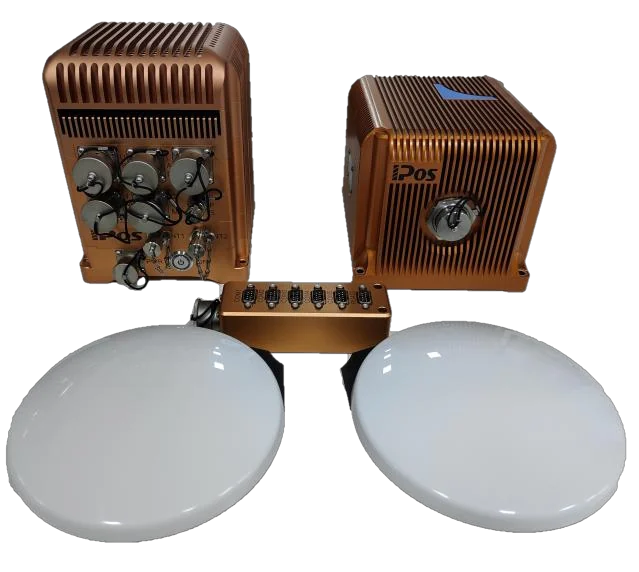
iPos MS11 deck unit, inertial measurement unit and two GNSS antennas
Shown: iPos MS11. System components illustrated; the supply configuration and accessories are confirmed with your quotation.

APPLICATION & SYSTEM

Three elements. One navigation system.

Evaluate iPos MS when your vessel-based survey system needs position, attitude, heading and heave for georeferencing and motion compensation. Start with the outputs your survey equipment needs and the conditions in which it will operate.

COMPONENT / 01

Deck unit

Combines GNSS and inertial observations, runs navigation processing and provides data to the connected survey system.

COMPONENT / 02

Inertial measurement unit

Three gyroscopes and three accelerometers measure vessel motion. Its mounting position and orientation are part of the system configuration.

COMPONENT / 03

Dual GNSS antennas

Provide satellite observations for positioning and heading. Sky visibility, antenna separation and rigid mounting affect the installation.

Conceptual data flow, not a wiring diagram or packing list. Confirm connectors, cables, receiver options, software, licenses and accessories for the selected configuration.

MS11 / MS12 / MS13

Compare attitude and heading requirements.

The series differs in roll, pitch and heading performance. Compare the same GNSS correction mode and antenna baseline, then review the model against your complete installation.

Comparison conditions: GNSS signals locked. All angular figures below are 1σ. DGPS and RTK identify the correction mode; heading baseline is the distance between the two GNSS antennas.

On a narrow screen, scroll the table sideways to compare all three models.

iPos MS attitude and heading accuracy with GNSS locked
Performance & conditionsiPos MS11iPos MS12iPos MS13
Roll & pitch · DGPSGNSS locked · 1σ0.02°0.03°0.04°
Roll & pitch · RTKGNSS locked · 1σ0.01°0.02°0.03°
Heading · 2 m baselineGNSS locked · 1σ · DGPS or RTK0.03°0.06°0.08°
Heading · 4 m baselineGNSS locked · 1σ · DGPS or RTK0.015°0.03°0.06°
Discuss a modelDiscuss MS11Discuss MS12Discuss MS13
Use these figures for initial selection. They describe GNSS-locked performance, not performance during a signal outage. Confirm the specification, receiver configuration and availability for your project before ordering.

Antenna spacing limited, or model undecided? Share your heading target and available baseline.

Get series selection advice

INTEGRATION REQUIREMENTS

Plan the connections. Measure the installation.

Review equipment, timing, power and installation geometry together. IPOSView provides system configuration, status monitoring and data recording; the software and hardware versions should match your installation.

01 / EQUIPMENT & SOFTWARE

Define the data workflow.

Identify the survey instrument and acquisition software, required outputs and reference points. IPOSView connects to the deck unit over Ethernet for configuration and monitoring.

Plan the host PC and network settings together. Confirm the supported operating system and software version for the supplied unit.

02 / INTERFACES & TIMING

Match the protocol and timing.

Documented formats include TSS1, EM3000 and NMEA 0183, with serial and Ethernet data interfaces. GNSS correction formats include RTCM 2.x / 3.x and CMR / CMR+.

Confirm port count, electrical interface, message rate and PPS direction, polarity and pulse width against the selected hardware and receiving equipment.

03 / MECHANICAL & ELECTRICAL

Allow for the complete installation.

The documented deck-unit supply is 24 V DC. Confirm the supplied power adapter, total load, protection and vessel power quality before connection.

Check the current outline drawings, mounting holes, connector clearance and cable runs. Use rigid mounting and avoid locations subject to immersion, excessive shock or vibration.

04 / INSTALLATION GEOMETRY

Measure more than the baseline.

Give both antennas a clear view of the sky and stable positions relative to the IMU. Review potential multipath reflections and nearby transmitters.

Measure antenna and sensor lever arms and mounting angles in a common reference frame. Enter the offsets and orientations in IPOSView and save the configuration before checking navigation status.
From installation to usable survey data

  1. MeasureRecord the reference point, antenna baseline, lever arms and sensor mounting angles.
  2. ConfigureSet network, correction input, output messages and timing; save the installation settings.
  3. VerifyCheck GNSS and navigation status, record a sample and validate the receiving survey software.

SUPPLY, DOCUMENTATION & SUPPORT

Define what your project will receive.

Discuss model selection and configuration before ordering. System architecture describes how the product works; the quotation defines the actual delivery.

CONFIGURATION & DELIVERY

Confirm the supply scope.

Agree the model, receiver options, antennas, cables, software and licenses, together with quantity and delivery requirements. Availability, lead time and shipping arrangements are confirmed in the quotation.

Request a quotation
PRODUCT DOCUMENTATION

Get the applicable details.

Request the specification, outline and mounting drawings, connector information and installation guidance relevant to your intended model and configuration.

Request product information
INSTALLATION SUPPORT

Plan setup and handover.

Discuss configuration review, remote assistance and training needs. Any on-site work, travel, service scope and fees are agreed separately for the project.

BEYOND THE STANDARD CONFIGURATION

A constraint that needs another approach?

Interface, space, output or system configuration requirements may call for adaptation. An engineering review establishes whether the work fits an existing configuration or requires development.

Explore Custom Engineering

Tell us about your project.

A short question is enough to start. We can work through the details together.

Your inquiry

Share what you know; a complete specification is not required.

Need help describing your project?

Share any details you know. You don’t need to answer every point.

  • Your platform and the task you want to complete.
  • The outputs or performance you need, if known.
  • GNSS conditions, operating environment or installation limits.
  • Existing equipment, interfaces or timing requirements.

For custom development, start with your target performance and working conditions. You don’t need to select a product first.

Add project details (optional)

Included: iPos MS · Product Selection. You can change or clear these details.

Please share sensitive technical files through an agreed channel after we connect.

We use your details to respond to your inquiry. No marketing subscription. Read our privacy notice.

Prefer email? [email protected]